Agent Host architecture
The Agent Host is a dedicated process that runs agent harnesses and manages their sessions. Separating session execution from an individual window lets you work with the same session across interfaces and run agents close to your code and development tools.
This article explains the process boundaries, execution environments, session lifetime, and client dependencies for integrations that use the Agent Host. You don't need this architecture background to use agents. To identify the harness a session uses or compare Local and Copilot, see Choose an agent harness. For session-management tasks, see Manage sessions.
What this architecture enables
Separating the agent from the window that displays it provides these capabilities:
- Shared sessions: multiple clients can observe and control the same session, staying in sync.
- Remote execution: the host can run next to the workspace on another machine while clients connect from elsewhere.
- Independent execution: an agent session can continue without a connected editor while the host and its execution environment remain running. Tools provided by a client still require that client.
- Multiple agent implementations: different agent runtimes plug into one host-facing interface and present common session concepts to clients.
- Dedicated process: agents run in their own process, where they won't be blocked by busy extensions.
Claude and Codex harnesses are disabled when Copilot enterprise-managed settings apply. Contact the IT team that deployed the settings to discuss access.
Process architecture
The components have different responsibilities:
- Client: the Chat view, Agents window, or browser interface that displays a session and sends your requests.
- Agent harness: the implementation that coordinates the model, tools, and agent workflow.
- Agent Host: the process that runs supported harnesses and owns their sessions, independently of the clients displaying them.
The extension host remains responsible for extensions. Extensions can contribute tools, MCP servers, and custom agents without running the agent harness itself. Tools from extensions are available only in chats in an editor window where the extension is running.
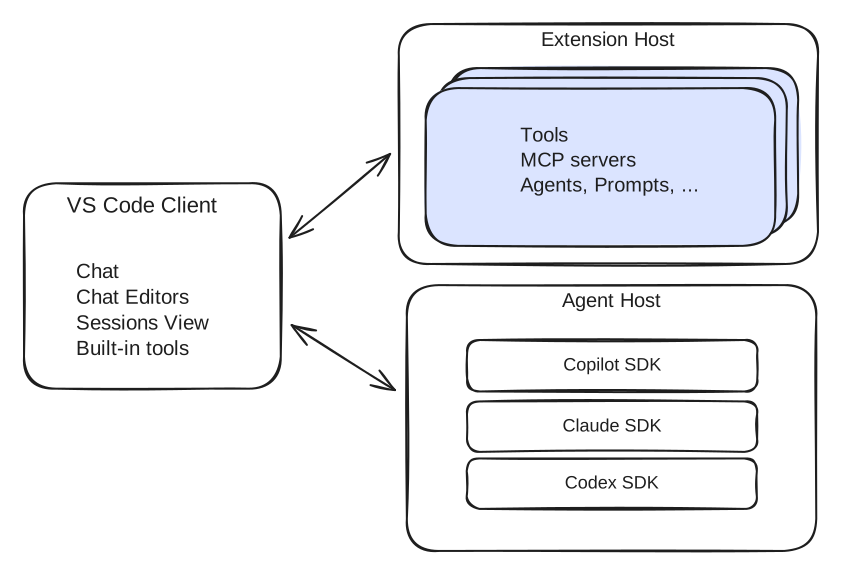
The Agent Host can run as a local utility process or as a standalone server on a remote machine. VS Code uses a message port for local IPC and AHP JSON-RPC over WebSocket for remote connections.
Agent adapters run inside the Agent Host process. An adapter translates between its agent runtime and the common Agent Host Protocol (AHP) session model.
Where sessions run
The Agent Host runs next to the workspace: on your machine, inside a Dev Container, or on a remote machine. Workspace file edits and commands use the environment that contains the host. This does not determine where the language model runs.
The Agents window can connect to an Agent Host on the same machine or on a connected SSH, Tunnel, or WSL host. SSH and dev tunnels provide VS Code-specific access to a remote host. A dev tunnel also supports the browser-based Agents window, where the browser is a client, not the host that runs the session.
GitHub Environments (Preview) extends continuity across supported Copilot clients. Register an existing machine with your GitHub account to access its agent sessions from VS Code, the GitHub Copilot app, Copilot CLI, GitHub.com, or GitHub Mobile. Supported sessions and actions differ by client. Registration doesn't move the workspace or provision compute, and the host must remain running.
The following diagram illustrates local, container, and dev tunnel deployments.
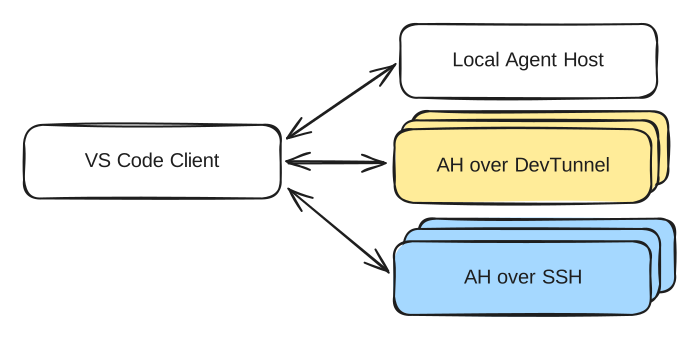
Clients display and control sessions. The Agent Host owns them. Desktop and browser clients can connect to the same tunnel host.
For a Dev Container session, the Agent Host runs inside the project's container. The container can run on your machine or on a supported SSH, Tunnel, or WSL host, while the Agents window remains on your machine. Workspace file edits and commands use the tools and dependencies inside the container, rather than those installed directly on the source host.
Dev Container execution is an environment choice, not a different harness. See the session execution options diagram for how local, connected-host, container, and cloud execution relate. For setup steps, see Run an agent session in a Dev Container.
Like VS Code Remote Development, the user interface stays on the client while workspace operations run close to the source code and development tools.
The Cloud target is a separate choice that uses provider-managed infrastructure. Cloud sessions Cloud sessions is experimental and might change or be removed. run the Copilot runtime in a managed environment that you can reconnect to from a client. Unlike registering your own machine with GitHub Environments, this provisions cloud execution.
Session lifetime and client dependencies
The Agent Host includes the baseline capabilities needed to manage sessions and work with the workspace without a connected client. A client can disconnect and reconnect to the same session.
An active turn can continue after its project window closes while the Agent Host remains running. For sessions managed by desktop VS Code on your machine, keep the application running. Closing a project folder is different from quitting the application.
For sessions on your own remote machines, keep the machine and the process serving the session running. Reconnecting to a session does not mean that active work continued while its host process was stopped or its machine was shut down.
Cloud session execution doesn't depend on keeping your local application open. The service manages the environment's availability and lifetime. A stored conversation doesn't guarantee that its cloud environment is still available. See continue an existing cloud session.
Connected clients can contribute tools, such as browser tools or tools from installed extensions. The Agent Host adds those definitions to the session and routes each tool call back to the contributing client. These tools require that client to remain connected. Learn how to manage tool availability.
Agent Host Protocol
Agent Host Protocol is an open, agent-agnostic protocol between a host and its clients. It uses JSON-RPC for communication and immutable state with pure reducers for synchronized session data.
The host is the source of truth. Each client subscribes to URI-addressed channels for resources such as sessions, chats, terminals, and changesets. The client receives an initial state snapshot followed by ordered actions. If the connection drops, the client reconnects and receives missed actions or a fresh snapshot.
For protocol definitions and implementation details, see the Agent Host Protocol source repository.
Run a standalone host
To run your own standalone Agent Host, use code agent host. By default, the command starts a server on localhost and protects it with a connection token. Use the --tunnel option to expose it through a dev tunnel.
Local and existing extension-host sessions
Not every agent session uses the Agent Host. Sessions use the extension host in these cases:
- You select the Local harness when you create a session.
- You continue a session that was created with the earlier extension-host architecture, before Agent Host-backed sessions were available.
Extension-host sessions are closely integrated with the current editor window and its extensions. This integration comes with a tradeoff: the window owns the session, so closing the window stops ongoing work, and you can't continue the session from another interface.
Agent Host sessions are owned by a dedicated process instead of an individual editor window. They can continue after you close the window and can be reopened from supported interfaces while the host remains running. Running agents in a separate process also prevents a busy extension host from blocking them. However, tools contributed by an editor window, such as tools from installed extensions, remain available only while that window is connected.
The process boundary also affects how you review edits, configure the agent, and continue sessions. For task-specific differences, see the following guides:
| Task | Guidance |
|---|---|
| Review saved edits | Local harness-specific behavior. |
| Configure instructions and custom agents | Choose customization scope and locations or move existing customizations. |
| Configure hooks | Choose the hook implementation for your session. Sharing a host does not give harnesses a shared hook schema. |
| Set permissions and Autopilot behavior | Manage approvals and permissions. |
| Continue sessions across interfaces | Sessions across surfaces. |
| Configure tools and MCP servers | Manage available tools and MCP configuration formats. |