Diagnose prompt caching with the Cache Explorer
Some language model providers can reuse an unchanged prefix from an earlier request instead of processing those input tokens again. The Cache Explorer compares consecutive model requests in a chat session to help you investigate whether changes to that prefix contribute to higher latency or token usage.
Use the Cache Explorer after the Agent Debug Logs Summary view reports low cache reuse together with unexpected duration or input token usage. For general agent failures, missing context, or tool errors, start with Debug chat interactions.
Understand prompt caching
Prompt caching is provider and model dependent. When it is supported, the provider might reuse the beginning of a request that matches cached content. A change early in the request can reduce how much of that prefix is reusable.
The Cache Explorer shows a diff between consecutive requests and identifies their first divergence. The diff helps explain a reported cache metric, but it does not prove how the model provider processed or billed the request.
Do not remove necessary instructions, tools, or context only to increase cache reuse. Response quality and task correctness take priority over the cache metric.
Before you start
To make the comparison useful:
- Use a session with at least two model requests.
- Open the Agent Debug Logs Summary view and confirm that cache reuse is low for a request that also has unexpected duration or input token usage.
- Compare requests from the same session. Keep the model and task comparable when you verify a change.
If the Summary view does not report cache information, the selected model or provider might not expose it. Use the Logs view to investigate request duration, errors, and tool calls instead.
Open the Cache Explorer
- Open the Agent Debug Logs panel by selecting the ellipsis (...) menu in the Chat view and selecting Show Agent Debug Logs.
- Select the session description in the breadcrumb to open the Summary view.
- Select Cache Explorer.
Read the comparison
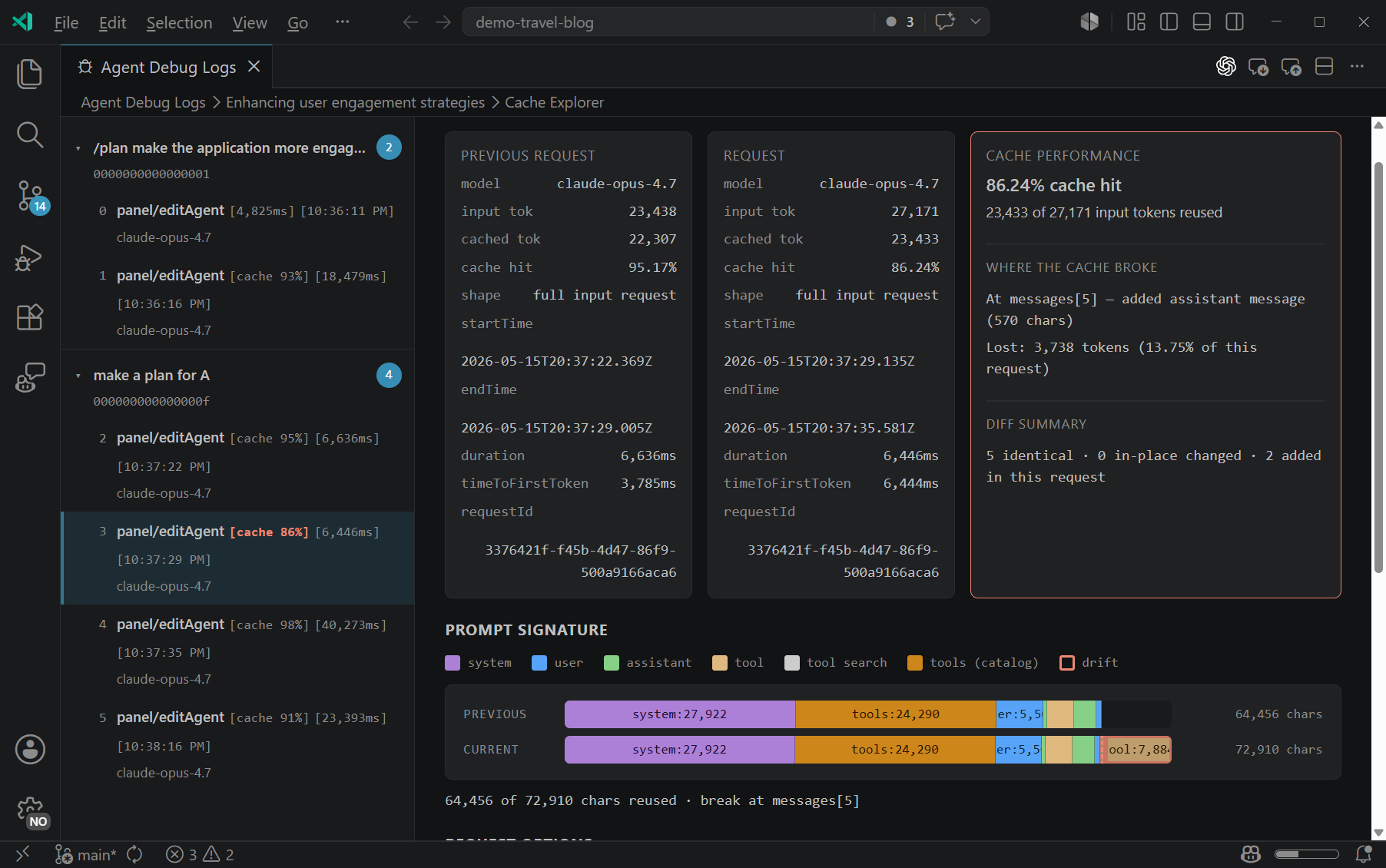
The side panel lists model turns grouped by user request. Each turn can show the cache hit percentage, duration, model name, and timestamp. Select a turn to compare its request with the preceding request.
The main area contains:
- Cache performance: The reported cache percentage and the number of reused input tokens.
- Prompt signature: A summary of request components, such as system instructions, tool definitions, and messages. The first divergence marks where the consecutive requests stop matching.
- Components: Expandable text diffs for the request components.
If a turn has no preceding model request, there is no consecutive request for the Cache Explorer to compare.
Investigate a cache miss
- Select a turn with low reported cache reuse and unexpected duration or input token usage.
- Find the first divergence in the prompt signature.
- Expand that component and identify what changed.
- Decide whether the change was necessary and under your control.
- Make one justified adjustment.
- Start a new session with the adjusted configuration and repeat the same two-request sequence.
- Compare the second request's cache metric, duration, input token usage, and response quality. Keep the adjustment only if the overall result improves.
For example, suppose the first divergence is in the tool definitions because you enabled an MCP server between turns. If the server is required for the task, keep it and accept the lower reuse. If it is not required, choose your tools before starting a new session and repeat the same two-request sequence. A change in the diff is evidence about the request structure, not proof that caching caused all observed latency.
Keep request context stable
The following practices can reduce unnecessary changes between turns:
- Choose session options before starting: Select the model, reasoning effort, context size, and required tools before the first request when possible.
- Keep shared instructions stable: Avoid editing instructions files or custom agent definitions while comparing turns. For guidance, see the context engineering guide.
- Attach only relevant context: Repeatedly adding or replacing attachments changes the request. Prefer focused context that the task needs.
- Isolate independent research: Use a subagent for a separate research task when keeping that exploration out of the parent conversation improves clarity.
- Reset long conversations intentionally: Start a new session or use
/compactwhen accumulated history no longer helps the task.
Some request components are assembled by VS Code, extensions, or the model provider and are not directly controllable. If the first divergence is outside your configuration, use the comparison as diagnostic evidence rather than attempting to rewrite your prompt around it.